
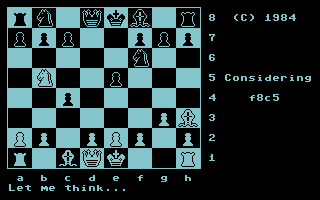
The main screen symbolizes a chessboard with marked letter coordinates and digital. Technical information is shown on the second screen: Lockahead - predicting your moves, along with the supposed answers to them. The number after the text indicates the number of analyzed longer movements. Best Line - the best continuation of the game according to the computer. The situation on the chessboard is judged by two indicators _ material and tactical. Both values are analyzed by the computer very biased and should not be influenced by them. There are times when your computer in a moment he will be mated and his position evaluation is there still negative. Now that we know what to do, let's move on to how. SHIFT + T (M) -possibility to play in one with six modes: 4 1. Determining tournament parameters.
Firstly you enter the number of moves for the first] control time, then to two. Then set a time first and second checks. It is worth remembering that that the computer does not check whether you are complying conditions imposed. However, as befits an honest machine, he does everything himself instruction; 2. Mode. in which you change the computer's reflection time. Colossus becomes dangerous from about 30 seconds; 3. Determining the duration of the entire party. When any of the players will exceed the time limit. it will end miserably; 4. The option where the computer thinks over the movement for exactly as long as you do. 5. Examination of the mat position. 6. Problem mode - finding a checkmate in n moves or finding a mat in n moves. SHIFI '+ A - new position setting mode. You can use the (S) key to change the colors of the pieces, Black_ (black) to White (white) and vice versa. (W) causes all pieces to disappear from the board. (G) - returns to normal game. (M)